Appearance
Dashboard
Purpose
The dashboard is the morning screen: units in stock, inventory value, open pipeline, applications awaiting credit, a featured car, follow-ups, and recent applications.
Where to open it
Portal path: /
Nav: Dashboard
Page title: Dashboard
Who can use it
Administrator, Sales manager, Sales rep, Finance, and Viewer.
Video tour
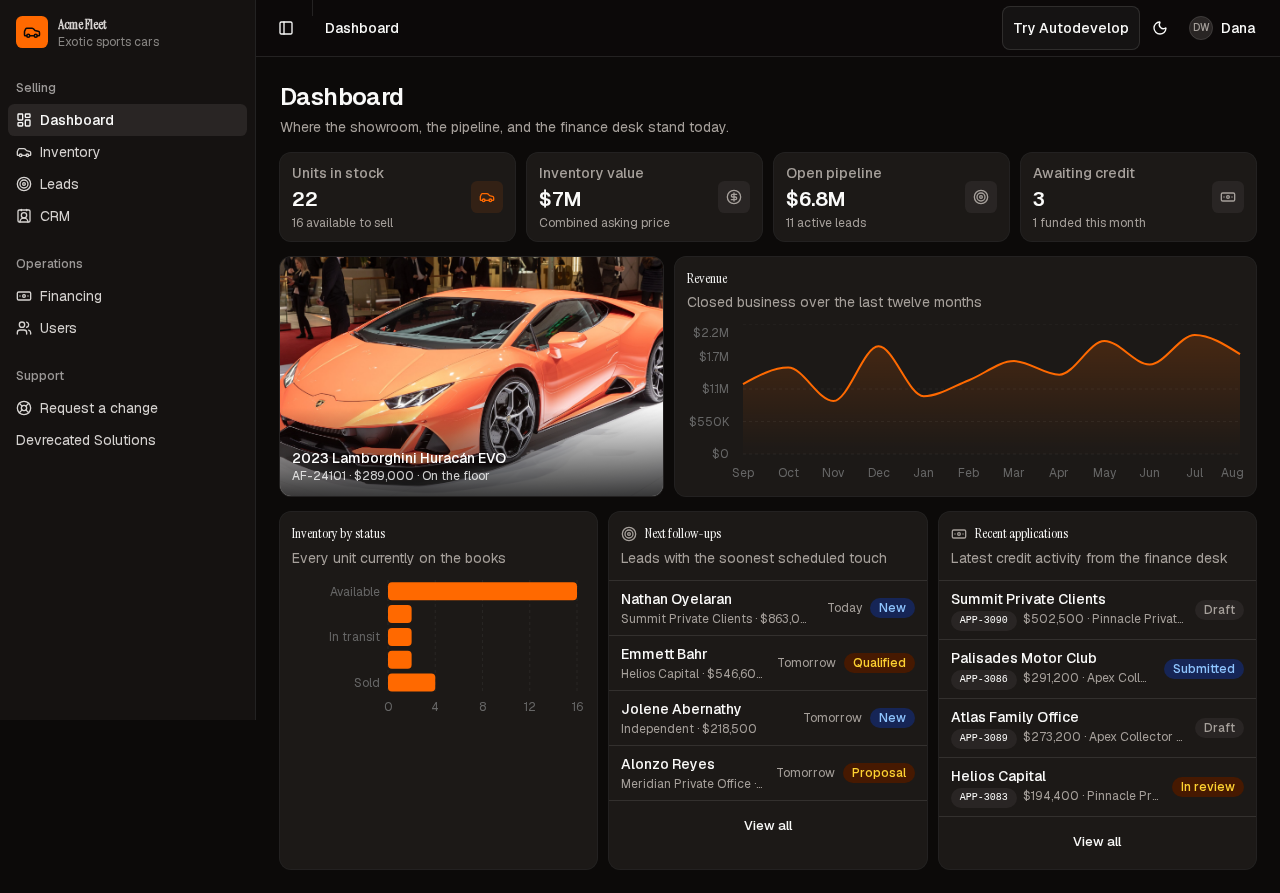
Home dashboard — stock, pipeline, featured unit, and follow-ups.
Step-by-step
- Sign in as Dana Whitfield (Administrator).
- Open Dashboard (
/). - Wait until a seeded Lamborghini and the stock counts are on the page, not the loading skeletons.
- Scan Units in stock, Inventory value, Open pipeline, and Awaiting credit.
- Use Next follow-ups and Recent applications to jump into Leads or Financing.
Actions reference
| Action | Where in UI | Notes |
|---|---|---|
| Featured unit | Left hero card | Opens Inventory |
| Next follow-ups | Lower cards | Leads with the soonest scheduled touch |
| Recent applications | Lower cards | Jumps toward Financing |
Tips
- If counts are zero, seed has not finished — wait; do not treat the empty chrome as the live desk.
- The featured unit links through to Inventory.
Look out for
After seed loads you should see Units in stock with a non-zero count, a featured Lamborghini, follow-ups, and recent applications. The header line about the showroom is not enough — that copy is on the page before the numbers arrive.