Appearance
Leads
Purpose
Leads is the sales pipeline as a kanban. Drag a card to change stage. New lead opens a form. Stage changes last for the session on this demo.
Where to open it
Portal path: /leads
Nav: Leads
Page title: Leads
Who can use it
Administrator, Sales manager, Sales rep, and Viewer. Finance does not see leads.
Video tour
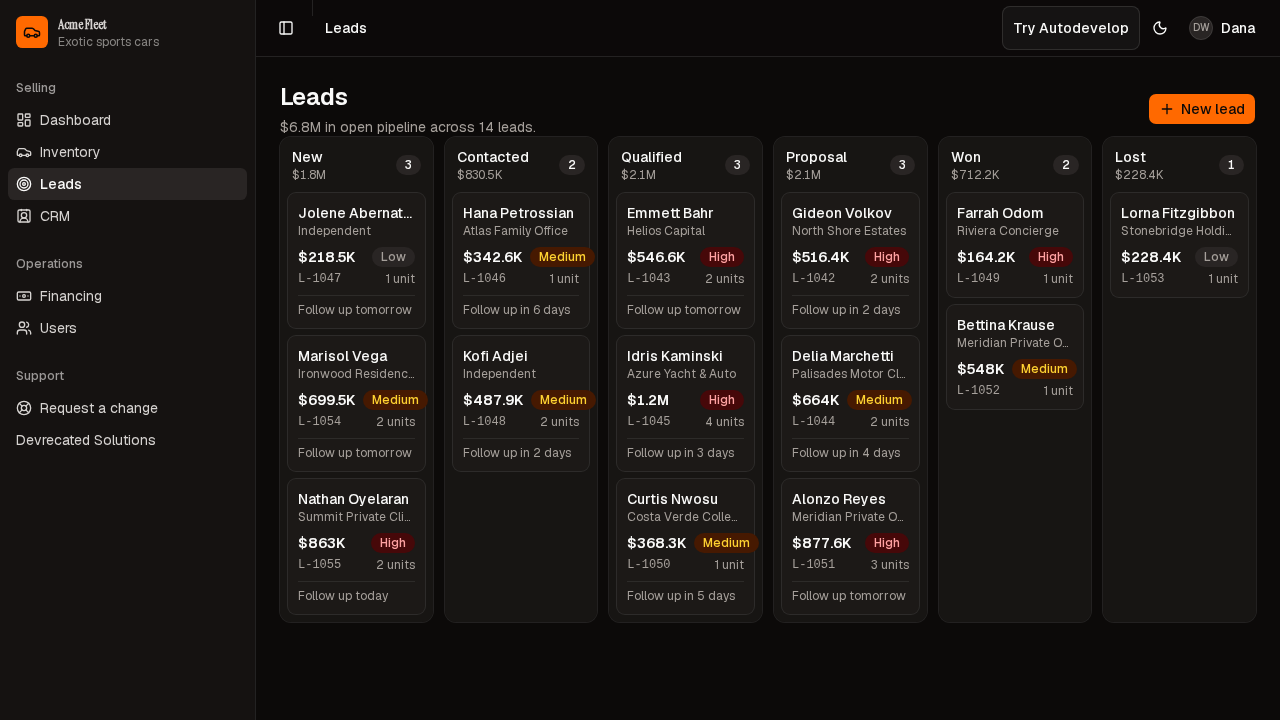
Kanban — columns, seeded cards, New lead.
What to read next
| Guide | When you need it |
|---|---|
| New lead | Open the form, then Cancel unless you mean to add a card |
Step-by-step
- Open Leads from the nav (
/leads). - Wait until Gideon Volkov is on the board.
- Read columns New through Lost.
- Drag a card only when you mean to move the deal. Use New lead to capture an inquiry — Cancel if you are only touring.
Actions reference
| Action | Where in UI | Notes |
|---|---|---|
| New lead | Header | Needs leads.edit; Cancel to leave the lot unchanged |
| Drag card | Board | Moves stage for the session |
Tips
- A drag is a stage change. Do not demo-drag production-like data if you care about the board staying put.
- Viewer can see the board; edit is withheld.
Look out for
The page title is Leads. As Administrator you should see New lead and seeded cards such as Gideon Volkov. New lead alone is the header; it is on screen while the columns are still empty.